
Puzzle Helper2.5.2 - Google Play
You'll be able to see results in few seconds.
Publisher Description
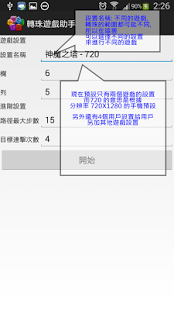
Function
-No Rooted Device
-Use screenshots to find a best puzzle path
-Suitable for any puzzle game
-User can set which should eat or reserve.
[Usage]
1)First, you should know how to take screenshots manually (e.g.: press Volumn Down and Power same time util success capture)
2)On configuration screen take screenshot once, then press "Click Me After Take Screenshots Manually" button, system will auto detect screenshots path
3)On main screen, default puzzle area is based on 720x1080,other than this resolution, please enter edit mode to adjust the puzzle area, save and exit
4)During puzzle game, take screenshots manually, system will auto detect the screenshots image and calculate the puzzle path, display the path after success
5)User may follow the path to finish N combo count
[Supported Game]
-Tower of Saviors
-龍族拼圖 Puzzle & Dragons 智龙迷城 P&D
About Puzzle Helper
The company that develops Puzzle Helper is Fantasy Application Company. The latest version released by its developer is 2.5.2.
To install Puzzle Helper on your Android device, just click the green Continue To App button above to start the installation process. The app is listed on our website since 2014-08-11 and was downloaded 0 times. We have already checked if the download link is safe, however for your own protection we recommend that you scan the downloaded app with your antivirus. Your antivirus may detect the Puzzle Helper as malware as malware if the download link to com.fac.android.app.puzzle is broken.
How to install Puzzle Helper on your Android device:
- Click on the Continue To App button on our website. This will redirect you to Google Play.
- Once the Puzzle Helper is shown in the Google Play listing of your Android device, you can start its download and installation. Tap on the Install button located below the search bar and to the right of the app icon.
- A pop-up window with the permissions required by Puzzle Helper will be shown. Click on Accept to continue the process.
- Puzzle Helper will be downloaded onto your device, displaying a progress. Once the download completes, the installation will start and you'll get a notification after the installation is finished.
Program Details
System requirements
Download information
Pricing
Version History
version 2.5.2
posted on 2014-08-11
v.2.5.2,- 修正PAD暗心認錯珠問題,v.2.5.1,- 改善避珠功能, 路徑計算以消除自定風化珠為優先,v.2.5.0,-加強消珠及留珠功能,可以多色消珠及多色留珠,-當有留珠及消珠有同色時,消珠會優先,然後才留,-新增避珠功能,用戶可以自定風化珠,程式會根據已選擇的避珠來計算路徑,v.2.4.3,- 修正編輯模式閃退的問題,v.2.4.1,- 提高運算速度,- 提高高連擊的機會,- 小小修正,v.2.4,- 修正沒有Google Play而閃退的問題,v.2.3,- 修正問題,- 提高高連擊的機會,v.2.2.0,- 新增“只顯示在”功能, 用戶可以自由設置轉珠遊戲助手在那個遊戲中才出現,v.2.1,- 新增漸變線,v.2.0.4,- 新增路徑樣式可供選擇,v.2.0.3,- 小小修正,v.1.18,- 新增 欄,列,出珠方向 設置,用來支援 三國志Puzzle,v.1.17,- 改善工具按扭的大小,v.1.15,- 修正閃退的問題,v.1.14,- 延長路徑顯示時間為20秒,- 增加消珠選項,程式會盡量消除用戶選擇的顏色珠(測試中)
version 2.5.2
posted on 2014-08-11
Several fixes and updates
Disclaimer
Official Google Play Link
We do not host Puzzle Helper on our servers. We did not scan it for viruses, adware, spyware or other type of malware. This app is hosted by Google and passed their terms and conditions to be listed there. We recommend caution when installing it.
The Google Play link for Puzzle Helper is provided to you by apps112.com without any warranties, representations or guarantees of any kind, so access it at your own risk.
If you have questions regarding this particular app contact the publisher directly. For questions about the functionalities of apps112.com contact us.
